ANLEITUNGGUIDE
FINA in fünf Minuten.FINA in five minutes.
Ein Buch für ein Jahr. Drei Ansichten. Ein Ziel: wissen, was kommt. In der Pilotphase kostenlos und vollständig.One book for one year. Three views. One goal: know what’s coming. Free and complete while we pilot.
Was FINA istWhat FINA is
FINA führt ein Haushaltsjahr: alles, was hereinkommt, und alles, was hinausgeht — von Januar bis Dezember. Drei Arten von Geld halten das Buch ordentlich: Einnahmen (Gehalt, Nebentätigkeit), regelmäßige Kosten (Miete, Abos, Versicherungen, Kredite) und flexible Ausgaben — das Geld des Alltags, als ein Betrag je Monat und Kategorie, etwa „Haushalt" oder „Freizeit".FINA keeps one household year: everything that comes in and everything that goes out, January through December. Three kinds of money keep the book tidy: income (salary, side jobs), regular costs (rent, subscriptions, insurance, loans) and flexible spending — everyday money, one amount per month and category, like “household” or “leisure”.
Alles liegt in einer einzigen Datei bei dir — wo du sie hinlegst. Kein Konto, keine Cloud, kein Bankzugang.Everything lives in a single file of yours — wherever you keep it. No account, no cloud, no bank access.
Die Jahresansicht: hier baust du dein JahrThe year view: build your year here
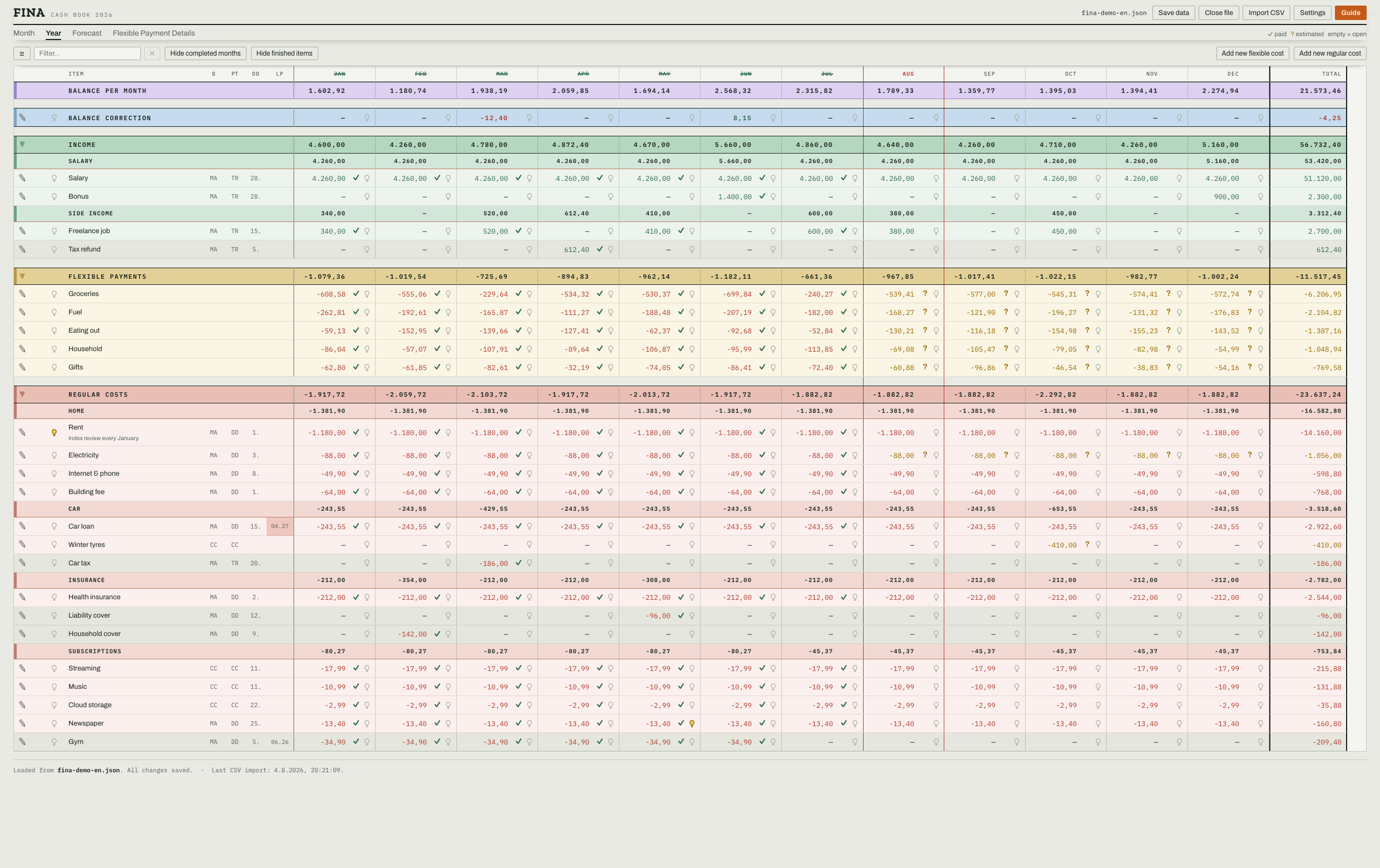
Zwölf Monate nebeneinander, jede Position eine Zeile. Hier legst du an: einmal die Miete eintragen, und sie steht in jedem offenen Monat. Abgerechnete Monate werden durchgestrichen, der laufende ist rot eingefasst.Twelve months side by side, one row per item. This is where you set things up: enter the rent once and it sits in every open month. Settled months get struck through, the current one is framed in red.
Die Spalte LP ist die Ampel: Sie zeigt, wie viele Zahlungen ein Abo, ein Vertrag oder ein Kredit noch kostet. Grün heißt: läuft diesen Monat aus. Blau: zwei bis drei Monate. Gelb: vier bis sechs. Rot: sieben oder mehr. So siehst du auf einen Blick, wann du wieder Luft hast.The LP column is the traffic light: it shows how many payments a subscription, contract or loan still costs. Green means: ends this month. Blue: two to three months. Yellow: four to six. Red: seven or more. One glance tells you when you’ll breathe easier.
Die Monatsansicht: hier hakst du abThe month view: this is where you tick things off
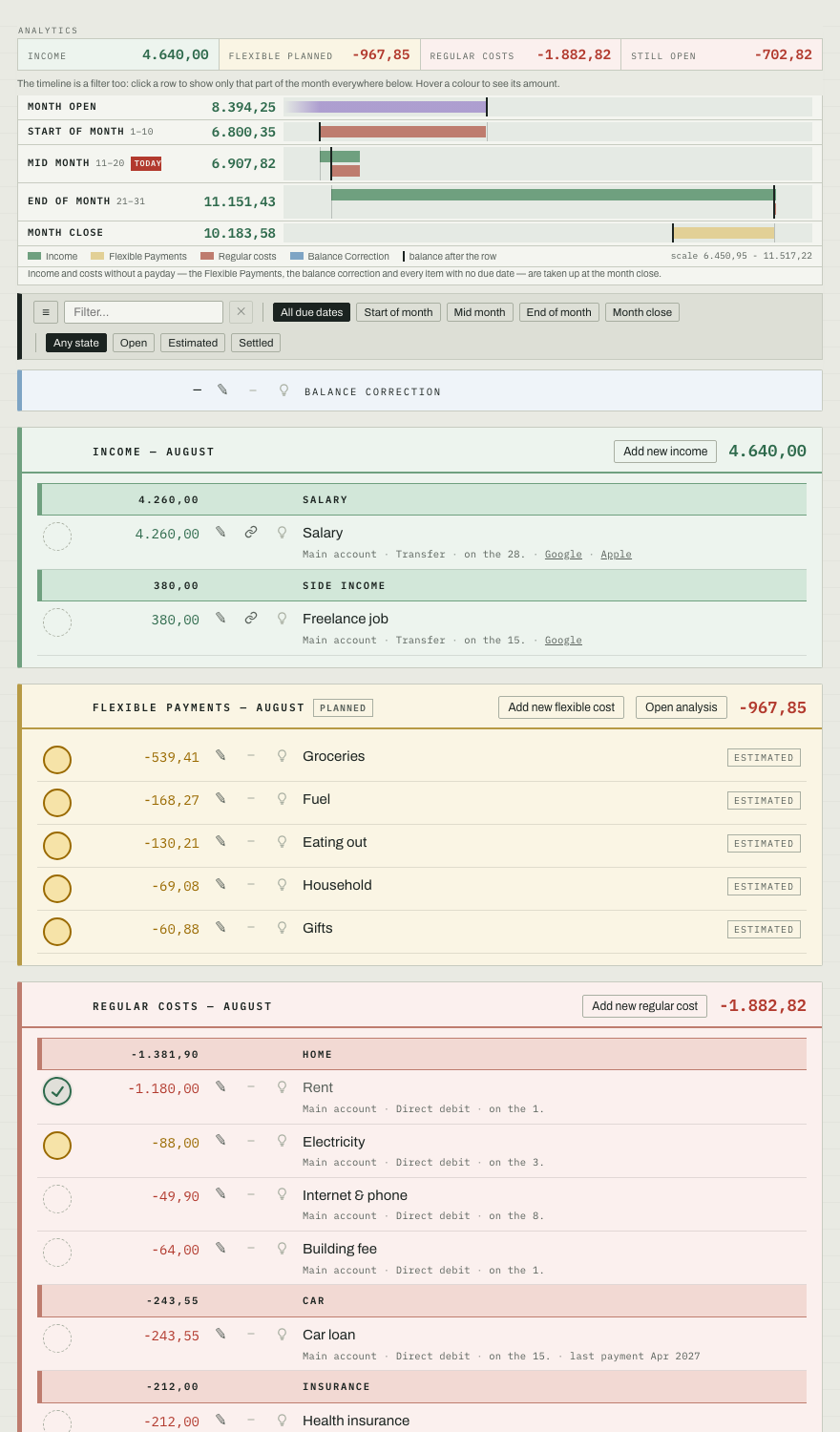
Ein Monat, drei Karten: Einnahmen, flexible Ausgaben, regelmäßige Kosten. Was bezahlt ist, hakst du ab — ein Klick auf das Siegel. Jede Zahl sagt dir dabei, wie belastbar sie ist:One month, three cards: income, flexible spending, regular costs. When something is paid, you tick it off — one click on the seal. Every number tells you how firm it is:
Abgehakt heißt: so war es wirklich. Offen heißt: steht noch aus. Orange heißt: geschätzt — die Zahl ist eine Annahme, keine Tatsache. Beim Abhaken eines geschätzten Betrags fragt FINA deshalb zuerst nach der richtigen Zahl.Ticked means: that’s what really happened. Open means: still due. Orange means: estimated — the number is an assumption, not a fact. That’s why FINA asks for the real number before you can tick off an estimate.
Die Prognose: dein Kontostand bis DezemberThe forecast: your balance through December
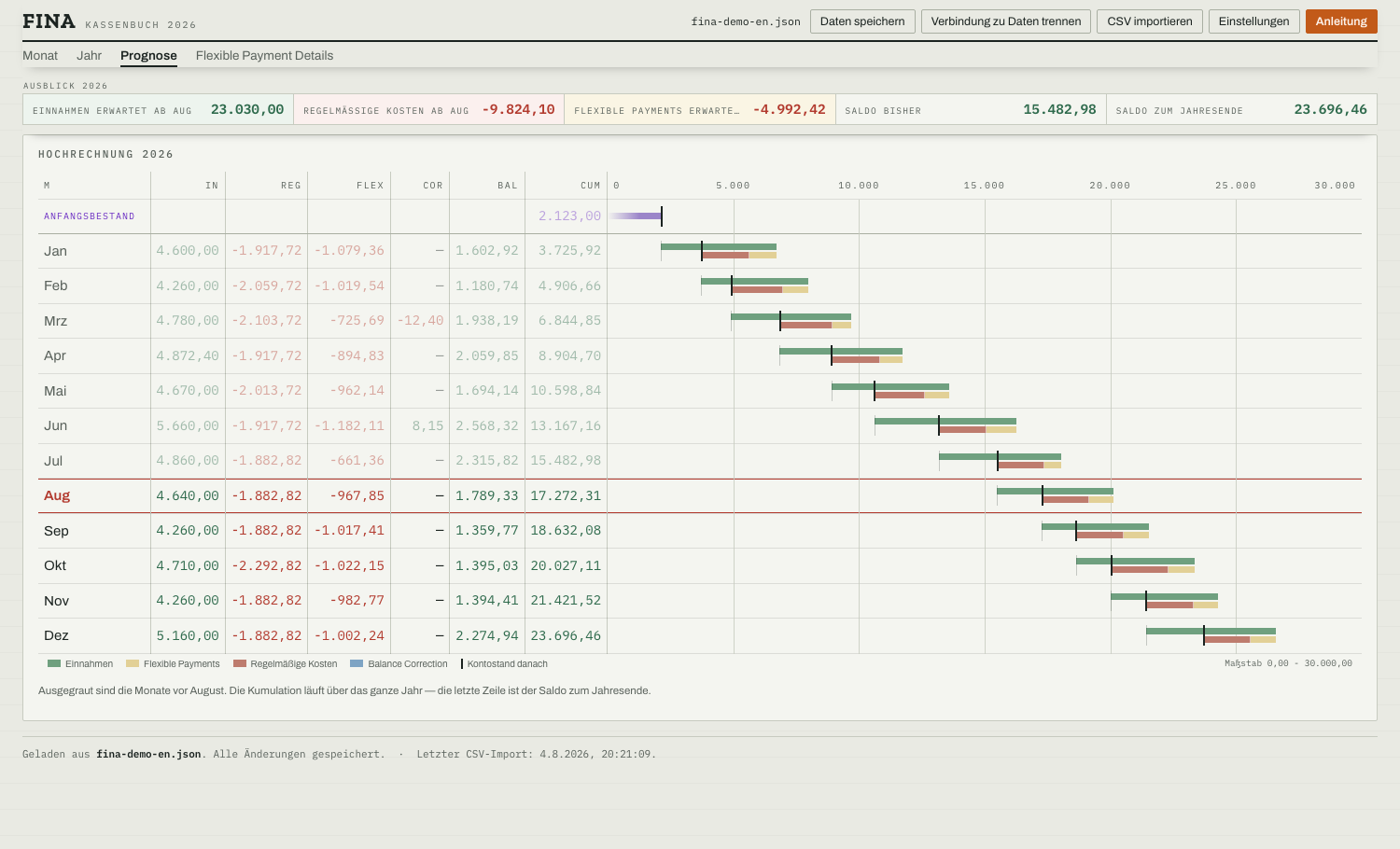
Jede Zeile ist ein Monat und liest sich wie ein Kontoauszug: womit er anfängt, was ihn bewegt, womit er schließt. Daneben zeichnet der Verlauf den Kontostand über das Jahr — du siehst eine Lücke, Monate bevor sie da ist, und genauso, wie viel Luft ein auslaufender Kredit dir verschafft.Every row is a month and reads like a bank statement: what it starts with, what moves it, what it closes with. Next to it, the track draws your balance across the year — you see a gap months before it arrives, and just as clearly how much room an expiring loan gives you.
Deine Daten, deine RegelnYour data, your rules
Dein ganzes Jahr liegt in einer Datei, und die liegt, wo du willst: auf dem Schreibtisch, im eigenen Cloud-Ordner, auf einem Stick. Gespeichert wird nur, wenn du auf Speichern klickst. FINA lädt nichts hoch — deine Zahlen gehen nie ins Netz.Your whole year lives in one file, and it lives wherever you want: on your desktop, in your own cloud folder, on a stick. It is only saved when you press save. FINA uploads nothing — your numbers never go online.
FINA läuft im Browser. Auf dem Telefon baut sich dieselbe Adresse für den kleinen Bildschirm um — unterwegs siehst du nach, was offen ist und wo du stehst; eingetragen und gespeichert wird am Rechner. Die Apps für Mac und Windows sind in Arbeit; sie öffnen später dieselbe Datei.FINA runs in the browser. On a phone the same address rebuilds itself for the small screen — on the go you check what is open and where you stand; entering and saving is done at the computer. The Mac and Windows apps are in the works; they will open the very same file.
Die Bilder oben zeigen die englische Oberfläche — Deutsch ist eingebaut und in den Einstellungen umgeschaltet.The screenshots show the English interface — German is built in, switchable in the settings.
So fängst du anHow to start
- Im Browser öffnen. Nichts installieren, nichts anmelden. „Deine neue FINA-Datenbank anlegen" wählen — oder erst die Demo-Daten öffnen und dich umsehen.Open it in the browser. Nothing to install, nothing to sign up for. Choose “Create your new FINA database” — or open the demo data first and look around.
- Einnahmen und Kosten eintragen. Miete, Gehalt, Abos — und ein Monatsbetrag für den Alltag. Einmal, für das ganze Jahr.Enter income and costs. Rent, salary, subscriptions — plus a monthly amount for everyday spending. Once, for the whole year.
- Monat für Monat abhaken. Was bezahlt ist, bekommt den Haken — Schätzungen werden dabei zu echten Zahlen.Tick things off month by month. What’s paid gets its tick — and estimates turn into real numbers.
- In die Prognose schauen. Da steht, wo dein Konto im Dezember steht.Check the forecast. It shows where your account lands in December.
Mehr Hilfe wohnt in der Anwendung: der Knopf „Anleitung" oben rechts erklärt jede Ansicht Schritt für Schritt — und mit jeder Datei schlägt sie sich von selbst daneben auf.More help lives inside the app: the guide button at the top right explains every view, step by step — and with every file it opens by itself alongside.